{"pageProps":{"blogs":[{"title":"How to build a website and go live in minutes","tldr":"Here is a quick way to build and launch your website in minutes!","tags":["website","nocode","html","css","blog"],"content":"### Building websites can be hard, but it shouldn't\n\nThere are a few different ways that you can go about building a website. You can either use a website builder, which will allow you to create a website without having to learn any code, or you can learn how to code and build a website from scratch.\n\nIf you want to use a website builder, there are a few different options that you can choose from. Weebly and Wix are two popular website builders that are easy to use and allow you to create a professional looking website without having to learn any code.\n\nIf you want to learn how to code and build a website from scratch, you will need to choose a programming language. HTML and CSS are two of the most popular languages that are used to build websites. Once you have learned how to code in these languages, you will be able to create a website that looks exactly the way that you want it to. \n\nBut hey! We are here to build website fast preferably in minutes. So here is a review of Weebly and Wix! Something that I think is the best tool for the problem!\n\n#### [Weebly](https://www.weebly.com) \nI have used Weebly for a few years now to create websites for my small businesses and have always been happy with the results. The platform is easy to use and has a lot of great features, including the ability to create a blog, an online store, and a members-only area. The only downside is that it can be a bit pricey if you want to use all of the features, but overall it is a great platform for creating a professional website.\n\n**Pros:**\n- Weebly is a very user-friendly platform that is great for those who are not very tech-savvy.\n- There is no need to download or install any software, which makes it very convenient.\n- Weebly offers a wide range of templates and designs that can be used for creating a professional-looking website.\n- The platform provides a drag-and-drop interface that makes it easy to add content and images.\n- Weebly is a very affordable platform, with plans starting at just $4 per month.\n\n**Cons:**\n- Weebly’s free plan is very limited in terms of features and storage space.\n- The platform does not offer a lot of customization options, which can be a drawback for those who want to create a unique website.\n- Weebly is not as widely used as some of the other website builders, which can make it difficult to find support and resources.\n\n## [Wix](https://www.wix.com/)\nWix is a great website builder that allows you to create a website for free. There are many templates to choose from and you can customize your website to look however you want. You can also add your own photos and videos, and create a blog.\n\n**Pros:**\n- Wix is an extremely user-friendly website builder with a drag-and-drop interface. This makes it ideal for those with no prior experience in web design.\n- Wix offers a wide range of templates and features to choose from, allowing you to create a professional-looking website without having to hire a web designer.\n- Wix is a very affordable website builder, with plans starting at just $5 per month.\n\n**Cons:**\n- Wix websites can be less flexible than those built with other website builders or coding languages, as they are limited to the features and templates offered by Wix.\n- Wix websites may not be compatible with all web browsers and devices.\n- Wix websites may be less search engine friendly than those built with other website builders or coding languages.\n\n### Conclusion\nNo code website builders help build websites fast by allowing users to create and edit web pages without having to write any code. This is especially helpful for those who are not familiar with coding or do not have the time to learn how to code. By using a no code website builder, anyone can create a professional-looking website in a fraction of the time it would take to build one from scratch.","thumbnail":null,"status":"released","author":"Rem Kim","createdAt":"2022-11-14T15:07:38.848Z","updatedAt":"2022-11-14T16:11:49.371Z","slug":"how-to-build-a-website-and-go-live-in-minutes","id":1668438458847,"releasedAt":"2022-11-14T16:10:44.249Z","thumbnailUrl":"https://rem-blog-bucket.s3.us-east-2.amazonaws.com/assets/6b07ebe5-43fe-409e-b657-96d2aa0cc138-800.png"},{"title":"Buying new house in Canada","tldr":"I bought a house in Canada and would like to share my experience. ","tags":["canada","house","realestate"],"content":"Earlier this year I have received an expected of some sort, but not \"not so soon\" so to say call from my landlord. In short, after 3 years living in a beautiful townhouse that me and my wife were renting, it was time to move on, because owner decided to sell it. \n\nHonestly this is very expected. When we moved in 3 years ago this was a freshly built area still under construction and it still is, however much better looking now. However back then in 2018 there were no Covid, there were no Real Estate market boom! Prices were high, but not as high and crazy as it is right now or in later 2021. When I was renewing my leasing agreement in 2021 I was afraid landlord would say that he wants to sell it, but no. \n\nAt first scared, but then gathered our thoughts together we decided that it is time to make a move and buy a property. \n\n## Budget\n\nBuying a house requires at least 5% of downpayment, long gone days where you can have 0% downpayment and walkout from bank with a house. There is also a catch, that in Canada you only pay 5% for the first 500k$ and then you pay additional 10%. So for the house that costs 800k we will have to pay 55k$.\n\nI knew one day this will happen and we would have to gather all cash from every account that we have a put towards a property ask family to help and finally make a bare minimum to pay for everything.\n\nIn total for the house you would need: *downpayment + land transfer fee + lawyer fee*. \n\n## Getting pre approved for Mortgage\n\nWhat I think is also important is to understand how much you can get from banks. That will give you a better picture of a price range or max price you should consider when buying a property. \n\nSo that is what I did, I reached to RBC Mortgage Advisor and started explaining my financial situation, what I have, how much I earn and finally got a pre approval. What I also found is that they can give you your very high limit of affordability and explain risks related to going too high. \n\nAlso, not sure if this is entirely true, but some realtors don't want to work with clients who don't have mortgage pre approval. Pre approval kind of says that you are serious and not just playing around and wasting anyones time. \n\nDefinitely suggest reaching out to Mortgage Advisor and work closely with one. Don't hesitate and don't be shy even in saying that you don't like their rates or that you are also in talks with other banks as his job is to give you an advice and not to force you into getting mortgage with their bank. \n\n## Searching for a house\n\nIn Canada the closer you to Toronto, the pricier will be the house. We were looking for a property in range between 700 - 800k and with few requirements.\n\n- Fairly new\n- Somewhat spacious \n- at least 3 bedrooms\n- Good neighbourhood\n- Has train station to get to Toronto \n\nand optional:\n- backyard\n- finished basement\n\nIn order to make search easier we used [HouseSigma](https://housesigma.com) which has map search and every filter you need. Perhaps the only site you need to find a property in Canada. \n\nSo given those requirements the only locations that we were interested in were: Hamilton, Oshawa, Brampton, Barrie. Because everything else is basically out of our price range. \n\n## Finding a Realtor\n\nYou can always search and book viewing and make an offer yourself, I would not suggest it. Realtor is the person who first of all will do all the actions listed before, but also represent you and your best interests. \n\nIn my experience realtor was giving a lot of advices about property and beyond. For example for people who are not aware about the area, realtor was giving a lot of insights about the neighbourhood. The good the bad and everything that you need to know. Also, realtor can talk to gain useful insights when negotiating an offer. \n\nLike I said realtor represents your best interests. Sometimes when you see a house for lets say 750k$ and you say you like it, you want to make an offer how much should you offer. First that I was thinking about is to offer more, however realtor knows that houses around were sold for a lower price or for exact price sellers are asking and can suggest to pay less or the asking price. Saving money is always good!\n\n\n## Scheduling viewing\n\nOnce we had our budget and scrolled over HouseSigma like million times we came up with a spreadsheet of properties we would like to see. We had 4-5 viewing per day on weekends and sometimes during the week. \n\nMostly we were operating from the list of requirements + realtors view on area and lastly on a feeling from a question __\"Do I see my self living in this property for X years?\"__.\n\nThe last one I think is very important, because everything might be good but you just don't think like this is __the one__. So you scratch this one from the list and move on. \n\n## Making an offer\n\nIt took us about a month to find a property we fell in love is and honestly when we found it we've made offer immediately. \n\nWe actually made 2 offer to different properties but first one got rejected. \n\nAlso we decided to always be greedy and offer below asking price. With this strategy there is a chance that offer will go through given that market is cooling down. However higher chance that it will bounce back with a number from seller or a note that there is a competing offer. \n\nWe actually only had one competing offer and our second offer was accepted fairly fast. \n\nOnce again I think this is very important to have a good realtor who will suggest how much you should increase an offer, but also realtor can negotiate with the other realtor and kind of sense some information about competing offer. Don't ask me, it is some Realtor wodoo magic. \n\n## What is next?\n\nWell now that we have an offer accepted, we are shopping for a better mortgage deal. I guess I will write up about it once I have something!\n\n### FIN\n \n\n\n","thumbnail":null,"status":"released","author":"Rem Kim","createdAt":"2022-04-18T15:27:57.287Z","updatedAt":"2022-04-19T01:15:19.862Z","slug":"buying-new-house-in-canada","id":1650295677287,"releasedAt":"2022-04-19T01:15:19.855Z","thumbnailUrl":"https://images.unsplash.com/photo-1518780664697-55e3ad937233?ixlib=rb-1.2.1&ixid=MnwxMjA3fDB8MHxwaG90by1wYWdlfHx8fGVufDB8fHx8&auto=format&fit=crop&w=930&q=80"},{"title":"How to make Autocomplete in React.js with Fuse.js","tldr":"In this guide I will teach you how to build Autocomplete input with Fuse.js and React.js","tags":["react.js","fuse.js","styled-components","guide","autocomplete"],"content":"## Demo project setup\n\nFirst up let's create new React app. This should setup React using `create-react-app`.\n```command-line\nnpx create-react-app autocomplete-demo\ncd autocomplete-demo\nyarn start\n```\n\nNext we will need 2 extra dependencies [Fuse.js](https://fusejs.io/) and [Styled Components](https://styled-components.com/).\n\n__Fuse.js__ will help us with fuzzy search on client side since we will not be storing user searches anywhere but on a client side.\n\n__Styled Components__ is to make everything look pretty\n \nLet's install those\n\n```command-line\nyarn add fuse.js styled-components\n```\nNow that everything is installed, let's get to coding part!\n\n## Autocomplete component\n\nFirst create folder named Autocomplete and index.js file\n```command-line\nmkdir Autocomplete\ntouch Autocomplete/index.js\n```\n\nThere are 3 core elements in this Autocomplete component implementation:\n- Input for entering text\n- Suggestions list\n- Shadow word match \n\n```jsx\n\nexport const Autocomplete = () => {\n const [searchTerm, setText] = useState(\"\");\n const [searchHistory, setHistory] = useState([]);\n const handleSubmit = (ev) => {\n ev.preventDefault();\n const set = new Set([...searchHistory, searchTerm]);\n setHistory([...set]);\n setText(\"\");\n };\n return (\n
\n );\n};\n```\n\nThis is what we have so far. Every time user submits search query we add it to searchHistory and show it in the list.\n\n\nNow I know this is already looks very pretty but let's do some styling. Let's create `styles.js` file and add our styled-components there. \n\n```command-line\ntouch Autocomplete/styles.js\n```\n\nstyles.js\n```jsx\nimport styled from \"styled-components\";\n\nexport const AutocompleteContainer = styled.div`\n width: 450px;\n margin: 0 auto;\n`;\n\nexport const SuggestionsContainer = styled.div`\n position: relative;\n`;\n\nexport const SuggestionsDropdown = styled.div`\n position: absolute;\n width: 100%;\n border: 2px solid gainsboro;\n border-radius: 4px;\n margin-top: 2px;\n box-sizing: border-box;\n display: ${({ show }) => (show ? \"block\" : \"none\")};\n`;\n\nexport const Input = styled.input`\n width: 100%;\n padding: 1.1rem;\n border: 2px solid gainsboro;\n border-radius: 4px;\n font-size: 1.2rem;\n z-index: 10;\n background: transparent;\n\n &:focus {\n outline: none;\n border-color: lightblue;\n box-shadow: 0 0 4px lightblue;\n }\n`;\n\nexport const List = styled.ol`\n list-style: none;\n text-align: start;\n font-size: 1.1rem;\n padding: 0;\n margin: 0;\n`;\n\nexport const SuggestionItem = styled.li`\n padding: 1.1rem;\n transition: all 250ms ease-in-out;\n &:hover {\n background: #cccccc;\n }\n`;\n\nexport const MatchShadow = styled.div`\n position: absolute;\n border: 2px solid transparent;\n padding: 1.1rem;\n border-radius: 4px;\n font-size: 1.2rem;\n color: #cccccc;\n z-index: -1;\n user-select: none;\n background: transparent;\n top: 0;\n`;\n```\nThis should be enough, this contains enough styling for every element that we use.\n\nAutocomplete\n```jsx\nimport { useState } from \"react\";\nimport {\n AutocompleteContainer,\n Input,\n List,\n SuggestionItem,\n SuggestionsContainer,\n SuggestionsDropdown\n} from \"./styles\";\n\nexport const Autocomplete = () => {\n const [searchTerm, setText] = useState(\"\");\n const [searchHistory, setHistory] = useState([]);\n const handleSubmit = (ev) => {\n ev.preventDefault();\n const set = new Set([...searchHistory, searchTerm]);\n setHistory([...set]);\n setText(\"\");\n };\n return (\n \n \n {/* suggestions list */}\n \n 0 && searchHistory.length > 0}\n >\n \n {searchHistory.map((search) => (\n {search}\n ))}\n \n \n \n \n );\n};\n```\n\n## Fuse.js\n\nTime to add fuse.js and make our Autocomplete somewhat smart in its suggestions.\n\n```command-line\ntouch Autocomplete/useFuse.js\n```\n\nHere is a `useFuse` hook that we will use to make suggestions.\n\n```javascript\nimport { useEffect, useRef, useState } from \"react\";\nimport Fuse from \"fuse.js\";\n\nexport function useFuse(searchTerm, items, options = {}) {\n const fuse = useRef();\n const [suggestions, setSuggestions] = useState([]);\n useEffect(() => {\n fuse.current = new Fuse(items, options);\n }, [items, options]);\n useEffect(() => {\n const items = fuse.current.search(searchTerm);\n setSuggestions(items.map(({ item }) => item));\n }, [searchTerm]);\n\n return suggestions;\n}\n```\nEvery time we update `searchTerm` fuse will run search on that updated term and set new suggestions based on it. \n\nInjecting `useFuse` into Autocomplete component\n```diff\nimport { useState } from \"react\";\nimport {\n AutocompleteContainer,\n Input,\n List,\n MatchShadow,\n SuggestionItem,\n SuggestionsContainer,\n SuggestionsDropdown\n} from \"./styles\";\n+import { useFuse } from \"./useFuse\";\n\nexport const Autocomplete = () => {\n const [searchTerm, setText] = useState(\"\");\n const [searchHistory, setHistory] = useState([]);\n const handleSubmit = (ev) => {\n ev.preventDefault();\n const set = new Set([...searchHistory, searchTerm]);\n setHistory([...set]);\n setText(\"\");\n };\n+ const suggestions = useFuse(searchTerm, searchHistory);\n+ const exactMatch = (query, text) => {\n+ const regex = new RegExp(`^${query}`);\n+ return regex.test(text);\n+ };\n return (\n \n \n {/* suggestions list */}\n \n 0 && suggestions.length > 0}\n >\n \n {suggestions.map((search) => (\n {search}\n ))}\n \n \n \n \n );\n};\n\n```\n\nThis block adds usage of `useFuse` and pipes in searchHistory and searchTerm. \n```jsx\n const suggestions = useFuse(searchTerm, searchHistory);\n const exactMatch = (query, text) => {\n const regex = new RegExp(`^${query}`);\n return regex.test(text);\n };\n```\n\nThis is a helper function that will check if suggestion is exact match with query that user types in. If yes we will show autocomplete shadow of the suggested word in the input. Giving it a very nice touch for UX.\n```jsx\n const exactMatch = (query, text) => {\n const regex = new RegExp(`^${query}`);\n return regex.test(text);\n };\n```\n\nFinally here we add `MatchShadow` styled component and adding our exact match and other conditional checks to make sure we show it only when we have suggestions and it is an exact match. \n```jsx\n \n {suggestions.length > 0 &&\n exactMatch(searchTerm, suggestions[0]) &&\n suggestions[0]}\n \n```\n\n## Result\n\nWith all that in place let's check final result!\n\nAfter user types in few searches and submits them \n\n\nAnd if user request is exact match from previous search\n\n\n### I hope you found this guide useful! Thank you for reading.\n\n\n## Links\n- [Source code](https://github.com/rem4ik4ever/autocomplete-demo)\n- [Sandbox](https://codesandbox.io/s/polished-firefly-ur2of?file=/src/Autocomplete/index.js)","thumbnail":null,"status":"released","author":"Rem Kim","createdAt":"2021-08-20T01:39:43.672Z","updatedAt":"2021-08-21T00:34:43.189Z","slug":"how-to-make-autocomplete-in-reactjs-with-fusejs","id":1629423583672,"releasedAt":"2021-08-21T00:34:42.802Z","thumbnailUrl":"https://rem-blog-bucket.s3.amazonaws.com/assets/28a95f12-0ea8-4a88-ba98-46457979c409-screen-shot-2021"},{"title":"Preparing for Coding Interview","tldr":"Here are my tips on preparing for Coding Interview","tags":["programming","coding","challenge","problem","hiring","developer"],"content":"In my previous blog I've described few tips of preparing for an interview and how interview process looks like. \n[Tips on preparing for an interview](/blog/tips-on-preparing-for-an-interview-as-a-software-engineer) Today I want to share some preparation material with you.\n\n## What is Technical Interview?\n\nIn order to prove that you qualify for a Software Engineering position that you are applying to, you need to pass all technical interviews. Usually it is a 3 separate interviews depending on company but not less than 2. \n\n- Initial filtering (Algorithm problem, Homework challenge) \n- Second round (Algorithm / System design problem)\n- Final Round (System design / Domain specific interview)\n\n### Algorithm problems \n\nIf you are not prepared and/or didn't brush up your knowledge about data structures you will fail. \n\n__How to prepare for it?__\n\n__[LeetCode](www.leetcode.com)__ is a good source of coding problems to solve. If you are serious about preparation and getting hired by FAANG companies I'd suggest purchasing a subscription that will unlock additional questions and faster compile time. \n\n__[Grokking Algorithms](https://amzn.to/3frGoCD)__ if you are new to algorithms and want to read about it first, this book is a great starting point. Very descriptive illustrations will help you to visually understand how those algorithms work.\n\n__Practice a lot.__ You never know what problem you will get, so the more you practice the higher chance you will solve it.\n\n__LeetCode problems__\n\nI've found this list on [Blind](https://www.teamblind.com/) and so far this covered most of the problem topics.\n\nArray\n\n- [Two Sum](https://leetcode.com/problems/two-sum/ )\n- [Best Time to Buy and Sell Stock](https://leetcode.com/problems/best-time-to-buy-and-sell-stock)\n- [Contains Duplicate](https://leetcode.com/problems/contains-duplicate/)\n- [Product of Array Except Self](https://leetcode.com/problems/product-of-array-except-self/)\n- [Maximum Subarray](https://leetcode.com/problems/maximum-subarray/)\n- [Maximum Product Subarray](https://leetcode.com/problems/maximum-product-subarray/)\n- [Find Minimum in Rotated Sorted Array](https://leetcode.com/problems/find-minimum-in-rotated-sorted-array/)\n- [Search in Rotated Sorted Array](https://leetcode.com/problems/search-in-rotated-sorted-array/)\n- [3Sum](https://leetcode.com/problems/3sum/)\n- [Container With Most Water](https://leetcode.com/problems/container-with-most-water/) \n---\n\nBinary\n\n- [Sum of Two Integers](https://leetcode.com/problems/sum-of-two-integers/)\n- [Number of 1 Bits](https://leetcode.com/problems/number-of-1-bits/)\n- [Counting Bits](https://leetcode.com/problems/counting-bits/)\n- [Missing Number](https://leetcode.com/problems/missing-number/)\n- [Reverse Bits](https://leetcode.com/problems/reverse-bits/)\n\n---\n\nDynamic Programming\n\n- [Climbing Stairs](https://leetcode.com/problems/climbing-stairs/)\n- [Coin Change](https://leetcode.com/problems/coin-change/)\n- [Longest Increasing Subsequence](https://leetcode.com/problems/longest-increasing-subsequence/)\n- [Longest Common Subsequence]()\n- [Word Break Problem](https://leetcode.com/problems/word-break/)\n- [Combination Sum](https://leetcode.com/problems/combination-sum-iv/)\n- [House Robber](https://leetcode.com/problems/house-robber/)\n- [House Robber II](https://leetcode.com/problems/house-robber-ii/)\n- [Decode Ways](https://leetcode.com/problems/decode-ways/)\n- [Unique Paths](https://leetcode.com/problems/unique-paths/)\n- [Jump Game](https://leetcode.com/problems/jump-game/)\n\n---\n\nGraph\n\n- [Clone Graph](https://leetcode.com/problems/clone-graph/)\n- [Course Schedule](https://leetcode.com/problems/course-schedule/)\n- [Pacific Atlantic Water Flow](https://leetcode.com/problems/pacific-atlantic-water-flow/)\n- [Number of Islands](https://leetcode.com/problems/number-of-islands/)\n- [Longest Consecutive Sequence](https://leetcode.com/problems/longest-consecutive-sequence/)\n- [Alien Dictionary (Leetcode Premium)](https://leetcode.com/problems/alien-dictionary/)\n- [Graph Valid Tree (Leetcode Premium)](https://leetcode.com/problems/graph-valid-tree/)\n- [Number of Connected Components in an Undirected Graph (Leetcode Premium)](https://leetcode.com/problems/number-of-connected-components-in-an-undirected-graph/)\n\n---\n\nInterval\n\n- [Insert Interval](https://leetcode.com/problems/insert-interval/)\n- [Merge Intervals](https://leetcode.com/problems/merge-intervals/)\n- [Non-overlapping Intervals](https://leetcode.com/problems/non-overlapping-intervals/)\n- [Meeting Rooms (Leetcode Premium)](https://leetcode.com/problems/meeting-rooms/)\n- [Meeting Rooms II (Leetcode Premium)](https://leetcode.com/problems/meeting-rooms-ii/)\n\n---\n\nLinked List\n\n- [Reverse a Linked List](https://leetcode.com/problems/reverse-linked-list/)\n- [Detect Cycle in a Linked List](https://leetcode.com/problems/linked-list-cycle/)\n- [Merge Two Sorted Lists](https://leetcode.com/problems/merge-two-sorted-lists/)\n- [Merge K Sorted Lists](https://leetcode.com/problems/merge-k-sorted-lists/)\n- [Remove Nth Node From End Of List](https://leetcode.com/problems/remove-nth-node-from-end-of-list/)\n- [Reorder List](https://leetcode.com/problems/reorder-list/)\n\n---\n\nMatrix\n\n- [Set Matrix Zeroes](https://leetcode.com/problems/set-matrix-zeroes/)\n- [Spiral Matrix](https://leetcode.com/problems/spiral-matrix/)\n- [Rotate Image](https://leetcode.com/problems/rotate-image/)\n- [Word Search](https://leetcode.com/problems/word-search/)\n\n---\n\nString\n\n- [Longest Substring Without Repeating Characters](https://leetcode.com/problems/longest-substring-without-repeating-characters/)\n- [Longest Repeating Character Replacement](https://leetcode.com/problems/longest-repeating-character-replacement/)\n- [Minimum Window Substring](https://leetcode.com/problems/minimum-window-substring/)\n- [Valid Anagram](https://leetcode.com/problems/valid-anagram/)\n- [Group Anagrams](https://leetcode.com/problems/group-anagrams/)\n- [Valid Parentheses](https://leetcode.com/problems/valid-parentheses/)\n- [Valid Palindrome](https://leetcode.com/problems/valid-palindrome/)\n- [Longest Palindromic Substring](https://leetcode.com/problems/longest-palindromic-substring/)\n- [Palindromic Substrings](https://leetcode.com/problems/palindromic-substrings/)\n- [Encode and Decode Strings (Leetcode Premium)](https://leetcode.com/problems/encode-and-decode-strings/)\n\n---\nTree\n\n- [Maximum Depth of Binary Tree](https://leetcode.com/problems/maximum-depth-of-binary-tree/)\n- [Same Tree](https://leetcode.com/problems/same-tree/)\n- [Invert/Flip Binary Tree](https://leetcode.com/problems/invert-binary-tree/)\n- [Binary Tree Maximum Path Sum](https://leetcode.com/problems/binary-tree-maximum-path-sum/)\n- [Binary Tree Level Order Traversal](https://leetcode.com/problems/binary-tree-level-order-traversal/)\n- [Serialize and Deserialize Binary Tree](https://leetcode.com/problems/serialize-and-deserialize-binary-tree/)\n- [Subtree of Another Tree](https://leetcode.com/problems/subtree-of-another-tree/)\n- [Construct Binary Tree from Preorder and Inorder Traversal](https://leetcode.com/problems/construct-binary-tree-from-preorder-and-inorder-traversal/)\n- [Validate Binary Search Tree](https://leetcode.com/problems/validate-binary-search-tree/)\n- [Kth Smallest Element in a BST](https://leetcode.com/problems/kth-smallest-element-in-a-bst/)\n- [Lowest Common Ancestor of BST](https://leetcode.com/problems/lowest-common-ancestor-of-a-binary-search-tree/)\n- [Implement Trie (Prefix Tree)](https://leetcode.com/problems/implement-trie-prefix-tree/)\n- [Add and Search Word](https://leetcode.com/problems/add-and-search-word-data-structure-design/)\n- [Word Search II](https://leetcode.com/problems/word-search-ii/)\n\n---\n\nHeap\n\n- [Merge K Sorted Lists](https://leetcode.com/problems/merge-k-sorted-lists/)\n- [Top K Frequent Elements](https://leetcode.com/problems/top-k-frequent-elements/)\n- [Find Median from Data Stream](https://leetcode.com/problems/find-median-from-data-stream/)\n\n \n### System design \n\nThis interview type will test your knowledge of building complex applications. Scalability, resilience, caching strategy and much more is going to be part of this interview. You will need to explain your solution and also explain why you made certain decisions. \n\n__How to prepare for it?__\n\n__[Designing Data-Intensive Applications](https://amzn.to/3jmjmxY)__ - this book has it all. Distributed systems, databases, how tos, whys, limitations and much more. It is a pretty big book, but I suggest you read it. \n\n__Build your own projects__ - try building you own side projects. Most of the AWS resources can be easily enabled as a free tier so you can have your own playground and build what ever you want. \n \n## Conclusion\n\nPreparation is they key for success. Read books, work on real life projects and solve LeetCode problems to improve your programming, analytical and critical thinking. Good luck!","thumbnail":null,"status":"released","author":"Rem Kim","createdAt":"2021-08-01T17:18:32.051Z","updatedAt":"2021-08-18T22:06:00.508Z","slug":"preparing-for-coding-interview","id":1627838312051,"releasedAt":"2021-08-18T22:06:00.488Z","thumbnailUrl":"https://rem-blog-bucket.s3.us-east-2.amazonaws.com/assets/09e97b32-47a6-4f0f-b181-99ee841ae524-600.png"},{"title":"Tips on preparing for an interview as a Software Engineer","tldr":"Getting hired as a Software Engineer can be tough. Let me give you some important tips that helped me!","tags":["interview","challenge","software","fang","coding","code"],"content":"Let's say you are new grad and would like to apply for a startup, but you have no idea on what to expect from interview process. In this blog I will tell you my tips on how to pass technical interview and how to approach each step of the interview process! I will not cover types of coding questions and how to prepare for them. But will gladly describe those in my next blog. \n\nLet me just quickly outline somewhat basic steps of hiring process for a tech company. \n__\n\n1. Recruiter phone screening\n2. Project Manager phone screening\n3. First technical challenge\n4. (Virtual) Onsite interview - Final step\n\n__\n\nThose are the most common steps for an hiring funnel. Some companies might swap step 2 and 3 and/or have additional technical screening, because they are trying to fill Full Stack Engineer position and require additional Frontend or Backend challenge. \n\n### Recruiter phone screening\n\nQuick chat with company recruiter to identify if you are a good match, in terms of experience level and technical stack.\n\n### Project manager phone screening\n\nSame as recruiter phone screening, but this time will be more focused on your previous work experience.\n\n### First technical challenge\n\nThis is also called initial filtering. Usually conducted by one of the engineers you will be given a coding challenge to complete. \n\n### Onsite interview \n\nUsually consists of 4-5 interviews and takes 3-4 hours to complete. You will probably need to allocate full day for it in case if you work ask for a day off. \n\n- 1-2 Technical challenges\n- Leadership\n- Growth\n- CTO or VP of engineering \n\n\n## Tips for each steps \n\n### Recruiter and Manager phone screening\n\n- __[Stay positive and energetic](#positive-and-energetic)__ - show your interest in the company. \n- __[Do your homework](#do-your-homework)__ - research about the company that will help you to form a good picture about what company does. Also go to [Glassdoor](www.glassdoor.com) and look at company reviews, that can tell you a lot. For example you can find out about company work/life balance or if product is not aligned with engineering and much more. \n- __[Prepare \"About me\" story](#prepare-about-me)__ - both recruiter and manager will ask you to tell about yourself and your past experience. This is easy to prepare. Write something up, no longer than 2 minutes, make sure its eloquent and contains all the highlights you are proud of to make great initial impression. \n- __Prepare questions__ - at the end of each interview you will be asked if you have any questions. Now this could be moment where you can show that you __[did your homework](#do-your-homework)__ and ask something about company or your concerns or questions about benefits package. Some recruiters and managers think that if you don't have any questions at the end it could mean that you are not really interested in the company, however not everyone. \n\n### Technical interview preparation\n\n- __[Pick your language](#pick-your-language)__ - know your programming language of strength. This means language that you are most comfortable with. Your interviewer will probably say that you are allowed to use Google, but this can take your precious time to solve the coding problem and you will only have 30-45 minutes to do so. \n- __[Have backup language](#have-backup-language)__ - let's say challenge is to create OOP model of something and your language of choice was JavaScript. While this still can do the thing, JavaScript is more of a functional programming language and if I was asked to do something like that I would prefer to switch to Ruby. \n- __[Explain your solution](#explain-your-solution)__ - while solving the problem is the main goal, explaining your solution and your decision making is second most important thing to do. __Show your ability to clearly communicate your idea__\n- __[Write tests](#write-tests)__ - some coding challenges will require you to write tests, but if not, still write them to prove that your solution is correct and covers as many edge cases as possible. That will also help you identify flaws of your solution. \n\n### Growth, Leadership, CTO or VP conversation \n\n- __[Prepare for questions](#prepare-for-questions)__ - Usually questions for Growth and Leadership are widely available online, so do your homework and find questions examples and prepare your answers. \n- __[Be honest](#be-honest)__ - Be authentic, tell truth. If you want to be an awesome programmer in next 5 years say it. If you want to be team lead or product manager say it. \n- __[Prepare for unexpected](#prepare-for-unexpected)__ - CTO or VP might ask you something that you wont expect. For some its a SQL question, for some its something that they found in your CV for example recent C++ experience and he or she might pull a tricky question under their sleeve. So this one could be a surprise! \n\n\n### Wrapping up\n\nPreparation is the key, and for Software Engineers there is a huge emphasis on technical knowledge and making sure you solve the problem the most optimal way, while this is true make sure you don't forget about proper communication skills and prepare answers and questions in advance! \n\nGood luck in your interviews! \n\n\n","thumbnail":null,"status":"released","author":"Rem Kim","createdAt":"2021-07-25T14:06:26.013Z","updatedAt":"2021-07-25T21:25:48.268Z","slug":"tips-on-preparing-for-an-interview-as-a-software-engineer","id":1627221986013,"thumbnailUrl":"https://rem-blog-bucket.s3.us-east-2.amazonaws.com/assets/bf67c8e8-5cbf-4d31-bbaf-90990e1e3c28-600.png","releasedAt":"2021-07-25T21:04:00.022Z"},{"title":"Migrate from Rails to React two simple approaches","tldr":"Migration from legacy Rails app to React can be a challenge, I have helped 2 companies to perform a migration and would like to share 2 different approaches those companies used.","tags":["Ruby","Rails","ReactJS","react","iframe","migration","monolith","frontend","backend"],"content":"# Legacy Rails app\nThere are many legacy applications out there that want to migrate to new modern web apps using React or Angular, to bring much smoother and better user experience. However with existing client base and huge number of features to re-implement it becomes a huge challenge. \n\nIn my experience I had 2 cases of Rails to React migration and both took different strategies.\n\n- React app within Rails using webpacker (React in Rails)\n- Rails app with React app on a separate domain as an iframe (React iFrame)\n\nBoth approaches are viable and as practice shows work well in production.\n\n## React in Rails\nProbably will be first pick for many teams when deciding on how to migrate to React. Latest versions of Rails already come with Webpacker, however if you are running earlier version of Rails you will need to manually setup it up. \n\nIn general this approach is easier. You will still be working in existing Rails app. You can pass Rails props to component hence opening up room for server side rendering. On the other hand if you had a plan to completely detach Frontend from Backend, this does not really help since both Frontend and Backend codebases are in single monorepo, but if your team didn't have such plans and you just want to have React on Frontend then this will work well for you.\n\n### Pros:\n- Easy to start, lots of documentation on Webpacker and React \n- Add components to Rails pages \n- Potential to SSR (Server Side Rendering) if needed\n- No headache maintaining separate build/deploy pipeline \n\n### Cons:\n- Rails monolith is getting even bigger with 2 codebases in single repository \n- Issues with running Webpacker for earlier versions of Rails\n- Build time is longer\n\n## React iFrame\nNot as an obvious choice for some teams, however has its own pros and cons. \n\nThis approach helps to separate Frontend from Backend. You will have another repository for React app, which means it needs to have its own build and deploy pipeline. It can be a headache now that for full end to end feature you will need to coordinate backend and frontend deployments to make sure everything is delivered at the same time. But once migration is complete you will get a complete frontend backend delineation, now dedicated backend team can work on API and frontend team on React app. \n\nIframe has its limitations and they can be a deciding factor when picking this approach. \n\nIf you want to use `react-router` then you will find that even though you can navigate within iframe it will not update parent URL. \n\nIf you have authenticated pages, assuming you pass a token to iframe, React app will have to refetch user on every page when navigating in Rails app between React pages. \n\n### Pros:\n- Offload Frontend pieces from Rails monolith\n- Separate build/deploy pipeline\n- After migration is complete Rails becomes API only server\n\n### Cons:\n- Build/Deploy/CORS headache \n- No control over URL in iFrame\n- Need to authenticate on every page\n\n\n## Conclusion\n\nLike I said before both of those approaches work and depending on what you try to achieve one might work better than another. It is a common thing for legacy apps try to migrate to modern web frameworks, so knowing those techniques and their pros and cons can come in handy!\n\n\n\n\n","thumbnail":null,"status":"released","author":"Rem Kim","createdAt":"2021-02-20T22:16:16.169Z","updatedAt":"2021-02-21T22:40:57.546Z","releasedAt":"2021-02-21T22:40:57.546Z","slug":"migrate-from-rails-to-react-two-simple-approaches","id":1613859376169,"thumbnailUrl":"https://rem-blog-bucket.s3.amazonaws.com/assets/1a54a35b-4cb8-43d5-9f91-db1654bce405-screen-shot-2021"},{"title":"How to fix Google - looks like you're in a different country from the family manager","tldr":"Recently wanted to add my wife to my YouTube Premium subscription, however Google does not allow to add family members if they have different address","tags":["Google","YouTube","Premium","Subscription","country","family"],"content":"# Looks like you're in a different country from the family manager\n\nIt is very confusing on how does google determine if your family member if not in the same address as you. However it appears that your first payment method address is set to be your legal address.\n\nSo here are steps to fix this issue.\n\n1. Navigate to google.com or in Google Chrome click account and navigate to \"Manage your Google Account\"\n2. On the left hand navigation open \"Payments and subscriptions\"\n3. In \"Payment methods\" section find and click on link to \"Manage payment methods\"\n4. Navigate to \"Settings\" tab \n5. Find payment profiles and at this point you have 2 options. \n - Close all profiles that you have and do the same for your family member and then recreate payment profile with the same address\n - only delete payment profile for your family member, but entering your legal address. \n\nHope that helps!","thumbnail":null,"status":"released","author":"Rem Kim","createdAt":"2021-02-21T16:46:01.143Z","updatedAt":"2021-02-21T16:58:19.088Z","releasedAt":"2021-02-21T16:58:19.088Z","slug":"how-to-fix-google--looks-like-youre-in-a-different-country-from-the-family-manager","id":1613925961143,"thumbnailUrl":"https://rem-blog-bucket.s3.us-east-2.amazonaws.com/assets/b251f6cd-5bb5-47fa-8801-82b67f367c91-600.png"},{"title":"Saving blogs as JSON files. Next.js blog Part 2","tldr":"In previous blog I showed how to setup basic Next.js project. Here I will explain how to setup your own CMS and save blogs locally using Lambda functions.","tags":["next.js","cms","localstorage","lambda","serverless"],"content":"## Welcome to part 2 of Setting up Next.js blog!\nIt is obvious that you need some sort of storage to save your blogs. It could be good old MySQL or Postgres. It could be document storage like MongoDB, or something new and fancy like FaunaDB. In my case I didn't want to use any third party hosting/provider services to store my data and I also wanted to own data. So, I decided to save files locally and use Github as a data storage. \n\n# CMS\nThere are few things we will cover while building CMS. \n- Writing markdown and rendering markdown blog content\n- Saving/updating files locally using Lambda functions \n- Listing all blogs from files\n- Making sure you can only save/update/delete in development mode locally\n\n## Writing markdown \nI didn't want to write HTML for each blog to style it. So the easiest and right way to do it is to use markdown. \n\nI used package [react-markdown](https://github.com/rexxars/react-markdown) that allows you to render markdown input as HTML. Now since in my blog I use [Chakra UI](https://chakra-ui.com/) I had to pass renderer function in order for react-markdown package to know how to render each of markdown elements. \n\n\n \nFull blog form code [here](https://github.com/rem4ik4ever/next-blog/blob/master/src/cms/blogs/BlogForm.tsx)\n\nThis form allows us to write our blog in textarea as a markdown and then preview it using React Markdown package. We will use the same package to render it in blog page.\n\n## Saving blog file\nWe will be using Lambda functions which is Next.js API routes to save blog. \n\nSending POST request to `/api/cms/blogs` will save file. \n\n\n[Click here for code](https://github.com/rem4ik4ever/next-blog/blob/master/pages/api/cms/blogs/index.tsx)\n\nFirst of all we need to make sure that incoming request is `POST`, then we check if we are in development environment, by running `devonlyMiddleware` which I will describe later. After that we can proceed with saving file. \n\nHere is example structure of the blog file \n```JSON\n{\n \"title\": \"Newer draft\",\n \"tldr\": \"Some tldr\",\n \"tags\": [],\n \"content\": \"\",\n \"thumbnail\": null,\n \"status\": \"draft\",\n \"author\": \"Rem Kim\",\n \"createdAt\": \"2020-04-15T02:32:45.034Z\",\n \"updatedAt\": \"2020-04-22T21:19:19.791Z\",\n \"slug\": \"newer-draft\",\n \"id\": 1586917965034\n}\n```\nThose are the fields I find useful and need to be saved. For an ID i used current timestamp. \n\ngenerateFilename \n\n\ngetSlug \n\n\nand finally saveBlogFile\n\n\nI used `fileSystem.promises` in order to be able to use async/await syntax.\n\n## Update/Find blog\n\nNow, in order to find or update blog by its ID, i've added another api route\n`api/cms/blogs/[id]`\n\n[Click to see code](https://github.com/rem4ik4ever/next-blog/blob/master/pages/api/cms/blogs/%5Bid%5D.tsx)\n\nallFiles - This function will scan directory with blog files, reach each one and parse its content to JSON, then output array of blog objects.\n\n\nwriteJSONToFile and makeFilename\n\n\n## devonlyMiddleware\nI promised we will comeback to this one. Like I said before I want to be able to use all that functionality locally when spinning up local development server. However on production those api functions should error out. \n\nIn order to do it I've added `devonlyMiddleware` \n\n\n\n## Conclusion\nNow with those API routes, I can read/save/update blogs and github becomes my data storage. ","thumbnail":null,"status":"released","author":"Rem Kim","createdAt":"2020-05-10T17:53:24.476Z","updatedAt":"2020-05-10T21:23:44.912Z","releasedAt":"2020-05-10T21:23:44.912Z","slug":"saving-blogs-as-json-files-nextjs-blog-part-2","id":1589133204476,"thumbnailUrl":"https://rem-blog-bucket.s3.us-east-2.amazonaws.com/assets/2a76db77-37b1-426b-bc34-a01413963e63-450.png"},{"title":"Setting up your Next.js Blog","tldr":"How to setup and deploy your Next.js Blog? In this series I will describe the process of setting up Next.js project and deploying it to vercel.com","tags":["next.js","vercel.com","blog","development","deploy","guide"],"content":"### System requirements\n- [Node 10.13](https://nodejs.org/en/) or later\n- Linux, MacOS system\n\n### Getting Started\nLet's first install Next.js default starter project. In your terminal type\n```\nnpx create-next-app YOUR_APP_NAME\n```\nThis command will create a folder for your project and ask you if you want to install `Default starter project` or use existing Next.js templates from repository of examples. But we will use `Default starter project`.\n\nIf you don't want to use `create-next-app` just create project directory and run: \n```\nyarn init next-app\nor \nnpm create next-app\n```\nThis will also create a project for you. \n\nNow let's look at the structure of the created project.\n```\n.gitignore\nREADME.md\nnode_modules\npackage.json\npages\npublic\nyarn.lock\n```\n\nLet's go ahead and run a development server. Go to your terminal and type \n```\nyarn dev\n```\nThe default port is set to 3000 and once you navigate to `localhost:3000` in your browser you should see\n\n\n## Next.js commands\nIf you take a look at `package.json` file you will see that by default you will have 3 commands to run:\n- `dev` - run a development server with development features such as hot reload\n- `build` - creates an optimized production build of your project \n- `start` - run a server. In a production mode based on your recent build\n\n## Pages\nEverything we want to serve on the screen is stored in pages. Let's go ahead and edit existing `pages/index.js` file. \n\nFirst we will erase existing content of the file and add our own.\n```javascript\n const Home = () => {\n return(\n
\n
Welcome to my blog!
\n
\n )\n }\n\n export default Home;\n```\n\nAlso let's create another page and call it About page in `pages/about.js`\n```javascript\n const About = () => {\n return(\n
\n
This page is about me!
\n
\n )\n }\n\n export default About;\n```\n\nGood, now let's link those pages together and add some routing navigation. For that we will use 'Link' component from `next/link`\n\nadd the following line at the top of the `pages/index.js` and `pages/about.js`\n```javascript\nimport Link from 'next/link';\n```\nLet's update our pages to include links to each other.\n\n\n*_index.js_*\n```javascript\nimport Link from 'next/link';\n\nconst Home = () => {\n return (\n
\n
Welcome to my blog!
\n Learn more about me!\n
\n );\n};\n\nexport default Home;\n````\n\n\n*_about.js_*\n```javascript \nimport Link from \"next/link\"\n\n const About = () => {\n return(\n
\n
This page is about me!
\n Back home\n
\n )\n }\n\nexport default About;\n```\n\nNow you should be able to navigate between those pages.\n\n## Routing in Next.js\nAs you might've already understood in Next.js all the routing maps to `pages` folder.\n\n`pages/index.js` => `/` \n`pages/about.js` => `/about`\n\nSay you want to add nested routes, how would you do it? Easy! Let's create 2 new routes:\n`/blog` to list out blogs and `blog/[slug]` to view each individual blogs.\n\nFirst create a folder `blog` inside `pages`, then add 2 files:\n- `index.js` which will map to `/blog` route\n- `[slug].js` which will map to `/blog/your-blog-slug` route\n\nand that's it! \n\n\n## Fetching data \n\nNext.js supports both Static Generation and Server-Side Rendering. Depending on how you would like to fetch your data those two approaches are very handy! \n\nIn order to demonstrate Static Generation you will need to use 2 supporting functions in order to let Next.js to know how to generate pages during build time. \n\n- `getStaticPaths` helps generate routes\n- `getStaticProps` helps to fetch data during build time\n\n### Static Generation\nNow here is an implementation of `pages/blogs/index.js` using Static Generation\n\n```javascript \nconst BlogsPage = ({ blogs }) => (\n
\n);\n\nexport const getStaticPaths = async () => {\n const blogs = require('./blogs.json');\n const paths = blogs.map(blog => ({\n params: {\n slug: blog.slug\n }\n }));\n return {\n paths,\n fallback: false\n };\n};\n\nexport const getStaticProps = async () => {\n const blogs = require('./blogs.json');\n return {\n props: {\n blogs\n }\n };\n};\n\nexport default BlogsPage;\n```\n\nas for `blogs.json`, here is a simple json file to have some mock data.\n\n```json\n[\n {\n \"title\": \"How to cook pasta. Easy 3 steps!\",\n \"slug\": \"how-to-cook-pasta-easy-3-steps\",\n \"content\": \"Some amazing recepy!\"\n },\n {\n \"title\": \"NextJS or GatsbyJS?\",\n \"slug\": \"nextjs-or-gatsbyjs\",\n \"content\": \"Obviously NextJS *winkyface*\"\n },\n {\n \"title\": \"Coding your first NextJS blog is easy!\",\n \"slug\": \"coding-your-first-nextjs-blog-is-easy\",\n \"content\": \"Blog and NextJS.\"\n }\n]\n```\nNow if you navigate to `http://localhost:3000/blog` you should be able to see our super fancy styled list of blogs. \n\n### Server-Side Rendering\nLet's make `pages/blog/[slug].js` in order to fetch each individual blog post using `getServerSideProps`\n\n```javascript\nconst Blog = ({ blog }) => (\n
\n
{blog.title}
\n
{blog.content}
\n
\n);\n\nexport const getServerSideProps = async (req) => {\n const {slug} = req.query;\n const blogs = require('./blogs.json');\n const blog = blogs.find(bl => bl.slug === slug);\n\n return {\n props: {\n blog\n }\n }\n}\n\nexport default Blog;\n```\n\n## Conclusion\n\nI hope you learned something new in part 1, of this Next.js blog setup series. In the next part I will tell how to make a simple CMS setup to be able to write your blogs using web interface and save files locally as json files. That way you don't need to have a database and you can use github as a data storage!\n\nHere is a [source code](https://github.com/rem4ik4ever/blog-content/tree/master/nextjs-app) for our app enjoy!\n","thumbnail":null,"status":"released","thumbnailUrl":"https://rem-blog-bucket.s3.us-east-2.amazonaws.com/assets/fcf55b87-85fc-4f55-85d7-814a803a1d50-450.png","author":"Rem Kim","createdAt":"2020-05-03T19:21:43.819Z","updatedAt":"2020-05-05T01:39:42.687Z","releasedAt":"2020-05-05T01:39:42.687Z","slug":"setting-up-your-nextjs-blog","id":1588533703819},{"title":"Use Context API, avoid Props Drilling","tldr":"I bet everyone who works with React on day to day basis knows what it \"Props Drilling\". Passing props down the component tree can become quite a burden. Hers is how Context API can solve that problem!","tags":["reactjs","context","api","provider","state","reducer","props","drilling","hooks"],"content":"## Props Drilling\nLets look at this example component\n\n\nAs you can see, `Dashboard` is a sort of a Controller component that manages state using `React.useReducer`. It passes actions down to child components. \n\nIn some cases this is absolutely fine. However as your application grows you may run into a situation when most distant child needs state or an action from root parent component. \n\n```javascript\n\n \n \n < TheDeepestChildThatNeedsState />\n \n \n\n```\nThis is called \"Props Drilling\". Passing props down the component tree to child that needs it.\n\nAs a developer I try to recognize moments like that because maintaining that type of code in the future will be very hard. Thankfully its never too late to refactor! Well, I hope... \n\n\n\n## Context\n\n> Context provides a way to pass data through the component tree without having to pass props down manually at every level.\n\nNow lets see how we can refactor our example to utilize Context API.\n\nFirst of all lets understand how it works.\n\n\nYou can create Context using `React.createContext` and pass default value of the context. Once that is done you can wrap your components with ContextProvider, hence making its value available across every child component. Neat right?! \n\nNow let's come back to our example and refactor it using Context API and React Hooks. \n\n\n### Let's clean up and put code in its own files\n\n\n#### Actions\nDefine all actions in **actions.js** pay attention that it exports function that requires `dispatch` prop in order to trigger an action and exports function wrapper around dispatch.\n\n\n#### Reducers\nCorresponding reducers in **reducers.js**. It contains our `initialState` and `reducers` function to handle state updates.\n\n\n#### useData hook\nConnecting actions and reducers in simple yet elegant hook **useData.js** that will export _state_ and actions. \n\n\n#### useCtx hook\nNow lets put utility function that will create context and export `useCtx` hook and Context Provider in **createCtx.js**\n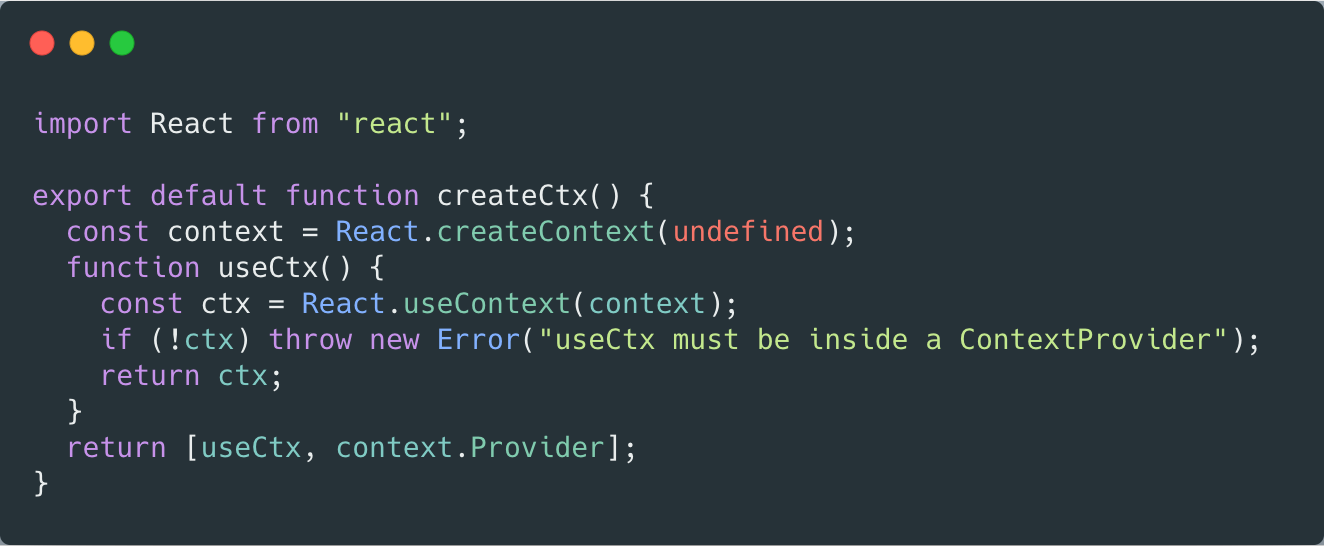\n\n#### contextApi.jsx\nHere is where all the magic happens **contextApi.jsx**. \n\n\nLet's break this one down. \n\n_First_ we create context using `createCtx()` and export hook `useDataContext` this will be used in child components to get access to state and actions.\n\n_Second_ we export `DataProvider` that will wrap child components and utilize our `useData` hook that will create our state from reducers and actions.\n\n#### And finally **App.jsx** \n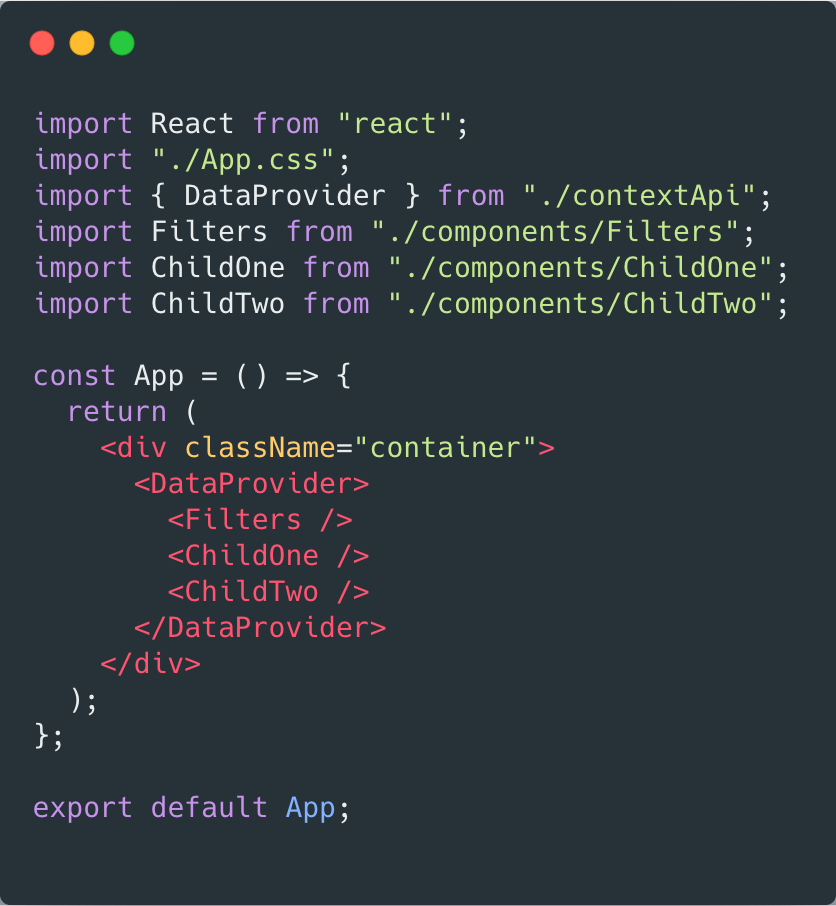\n\nClean isn't it? No props are being passed to child components. \n\nHere is **Filters.js** example on how to consume state and grab action from the Context\n\n\n\nIf you want to play around with example here is the [Link](https://github.com/rem4ik4ever/blog-content/tree/master/context-api)\n\n\n## Conclusion\n\nObviously its up to you how you want to manage state in your application and what state management architecture suits your case. But if you faced \"Props Drilling\" problem, I think Context API is the way to go!\n\n","thumbnail":null,"status":"released","author":"Rem Kim","createdAt":"2020-04-18T20:13:27.300Z","updatedAt":"2020-04-20T03:07:43.356Z","releasedAt":"2020-04-20T03:07:43.356Z","slug":"use-context-api-avoid-props-drilling","id":1587240807300,"thumbnailUrl":"https://rem-blog-bucket.s3.amazonaws.com/assets/ba072618-5f39-4b5e-a179-4e7dd88c7788-contextapimeme-j"},{"title":"My first Blog!","tldr":"I've been reading a lot of blogs on a day to day basis, but never recorder any of my personal blogs. I think its time to catch up!","tags":["blog","writing"],"content":"### Why starting a blog? \n\nI've always wanted to start a Blog, but kept procrastinating and thinking about what tools to use. First step is always the hardest! However I've been reading a lot of other blogs on a day to day basis and realized that all of those people, at some point, started writing and kept this as a habit, consistently writing their thoughts and ideas and putting it out there for people like me, to read it. \n\nI knew I have experience and desire to start it, so I decided to scaffold this little blog using tools that are relevant right now [Next.js(https://nextjs.org) and [React.js(https://reactjs.org/).\n\nThere are 3 main reasons why I want to have a blog: \n\n#### Have a backlog of ideas and knowledge\nAs a Software Engineer I constantly solve different technical problems and try to come up with creative solutions. However I haven't recorded any of those solutions, nor shared publicly. Which many developers practice in their blogs. Thus helping other developers to solve similar problem and have a log of something important.\n\n#### Personal and career growth\nSoftware Engineers don't usually blog. They write code, commit code and done deal. But recruiters and big companies don't look at your code, unless its an Open Source project with a lot of followers. Developers need to stand out, they need to go beyond resume small Github projects. Companies are looking for personality. Blog is a great place to show what kind of person you are. How you reflect of problems and ideas, how you solve them and what conclusions you drew after. \n\n#### Gain more experience in writing\nEver since school I was not a good writer. My essays were usually horribly graded and I was ok with that! I was not going to be a writer anyway. Err... now I realize that is some important skill I missed out. Knowing on how to express thoughts and ideas in writing is very important. It is not the same as writing documentation for the code, no. It is when you have a brilliant idea in your head and you want to write it down in a way that tomorrow it would not sound like a complete non-sense to you! \n\n### What will I write about?\nFirst and most importantly I will write about things I'm passioned about! I like new technologies in developers world. I like solving problems. I like to express my thoughts and help people. \n\nSecond, I want to write about my personal developer experience. What I do, how I do, what I find useful and interesting. Not that my opinion stands above all others, but I always would like to make my take on something that i'm interested in. \n\n### Here we go!\nLike I said before I've always wanted to start a Blog. And just like in Github each repository start with `initial commit`, this is my initial commit to this Blog!\n","thumbnail":null,"status":"released","author":"Rem Kim","createdAt":"2020-04-16T20:03:13.048Z","updatedAt":"2020-04-19T16:00:43.709Z","releasedAt":"2020-04-19T16:00:43.709Z","slug":"my-first-blog","id":1587067393048,"thumbnailUrl":"https://rem-blog-bucket.s3.amazonaws.com/assets/d2796a70-beb8-4270-9f27-f8c4ff737933-typewriter-jpg"}]},"__N_SSG":true}